




Please scroll down to see the English version.
Mit Release 4.9.1 kommt die Alarm-Route aus der Beta-Phase und ergänzt die Enginsight Plattform um Benachrichtigungsvorlagen sowie die Ausweitung der Import/Export-Funktion. Mit der UI-Überarbeitung für Observations setzen wir zudem die Vereinheitlichung der Plattform-UI fort, und E-Mail-Server sowie SMS-Gateway lassen sich ab sofort direkt in der Plattform konfigurieren. Darüber hinaus erhalten Pulsar, Loggernaut, Observer und Watchdog eine Reihe neuer Funktionen und Verbesserungen.
Alarm-Route: Raus aus der Beta-Phase
Die Alarm-Route hat die Beta-Phase erfolgreich durchlaufen und steht dir ab sofort im Full-Release zur Verfügung. Mit Benachrichtigungsvorlagen und der Import/Export-Funktion wird die Konfiguration deiner Alarme spürbar einfacher und übersichtlicher.
Einen ausführlichen Einblick in die neue Alarm-Route erhältst du in unseren Release Notes 4.9.0.
Oder schau in unserem Handbuch vorbei, um alle Funktionen der Alarm-Route kennenzulernen.
Benachrichtigungsvorlagen
Effizientere Alarmerstellung
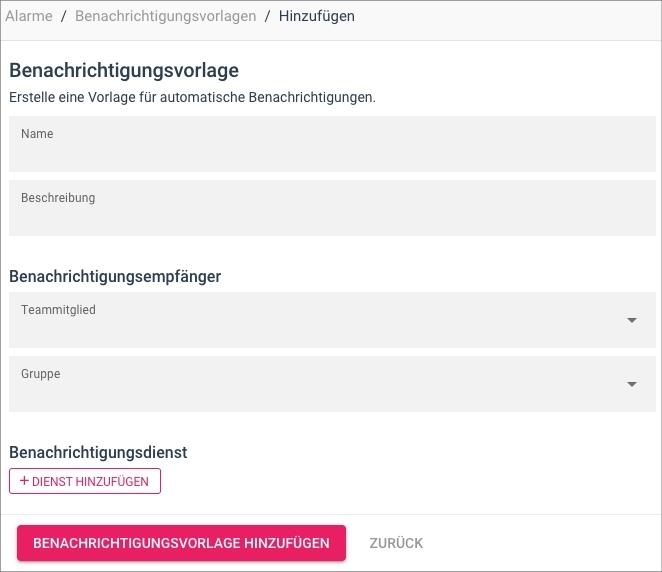
Mit Benachrichtigungsvorlagen führen wir einen neuen Bestandteil der Alarm-Route ein: Benachrichtigungsempfänger sowie Benachrichtigungsdienste von Drittanbietern lassen sich darin einmalig vorkonfigurieren, statt sie bei jedem Alarm erneut zu hinterlegen. Die fertige Vorlage ordnest du anschließend beliebig vielen Alarmen zu und reduzierst so den Konfigurationsaufwand nachhaltig.
Import/Export von Alarmen
Einmal konfigurieren, beliebig oft wiederverwenden
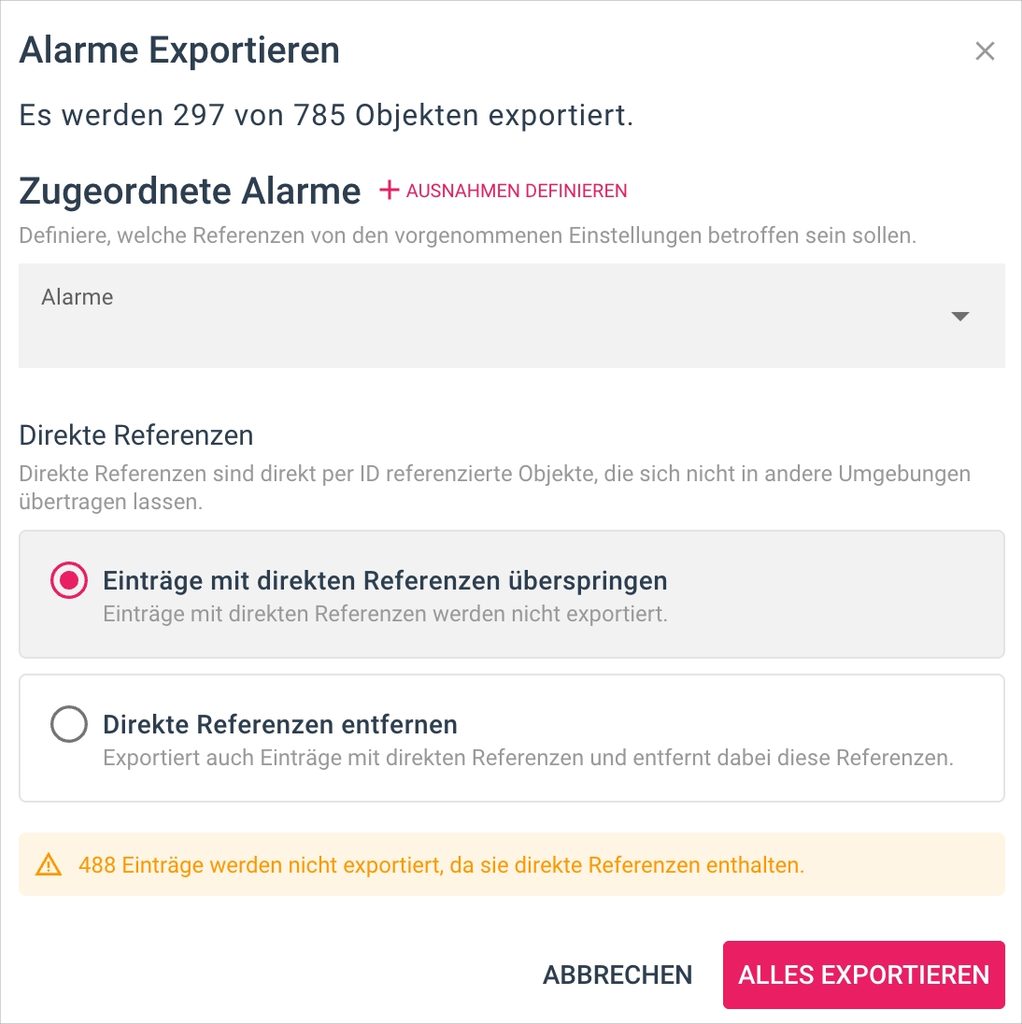
Die in Release 4.9.0 eingeführte Import/Export-Funktion steht jetzt auch für Alarme zur Verfügung. Bewährte Alarmkonfigurationen überträgst du damit unkompliziert zwischen Organisationen oder Installationen, statt diese bei jedem neuen Setup erneut manuell anlegen zu müssen.
Sicherheitsupdate
Node.js vorsorglich aktualisiert
Für Node.js wurden Schwachstellen mit dem Schweregrad „Hoch“ veröffentlicht. Betroffen ist unter anderem der Brotli-Decoder, dessen Sicherheitslücke hauptsächlich zu Dienstabstürzen führen kann. Weitergehende Auswirkungen sind unter bestimmten Bedingungen nicht ausgeschlossen. In einigen Plattform-Containern kamen betroffene Versionen zum Einsatz. In der Standardkonfiguration von Enginsight nimmt nginx die Verbindungen entgegen und übernimmt Kompression und TLS. Die betroffenen Funktionen von Node.js sind dort deshalb nicht direkt erreichbar.
Wir haben Node.js in den Plattform-Containern dennoch vorsorglich auf Version 24.22.1 aktualisiert. Mit diesem Release sind die betroffenen Versionen nicht mehr im Einsatz, weshalb wir allen Nutzern das Update empfehlen.
E-Mail-Server und SMS-Gateway (Beta)
Konfiguration jetzt direkt in der Plattform
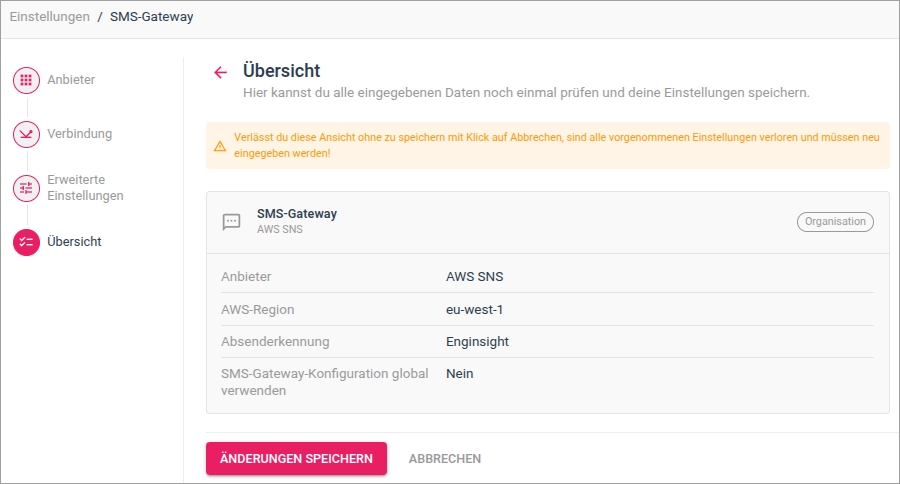
Was bisher nur über Anpassungen an der Konfigurationsdatei auf dem Applikationsserver möglich war, erledigst du ab sofort direkt im UI.
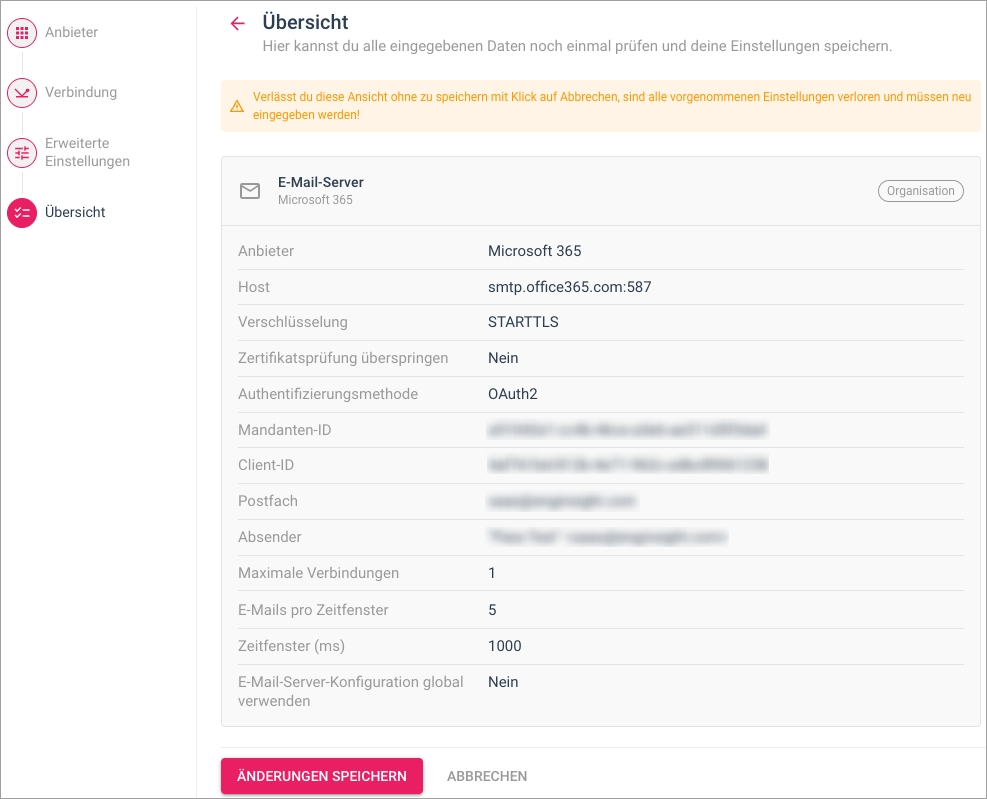
E-Mail-Server und SMS-Gateway kannst du jetzt bequem in den Organisationseinstellungen hinterlegen. Dabei führt dich der bereits aus der Alarm-Route bekannte Einstellungsassistent Schritt für Schritt durch die Konfiguration.
Beide Konfigurationen lassen sich dabei pro Organisation individuell definieren. Hinterlegt eine Unterorganisation keine eigene Konfiguration, erbt sie automatisch die der übergeordneten Organisation beziehungsweise den globalen Standard.
Anpassung der Hacktor Installation
Installationsskript benötigt manuell Installation von nmap
Ab Hacktor-Version 5.15.55 installiert das Installationsskript nmap (Network Mapper) nicht mehr automatisch mit. Installiere nmap deshalb einmalig manuell auf dem Komponentenserver, bevor du den Hacktor einrichtest, da dieser nmap für Penetrationstests benötigt. Die Schritte findest du im Handbuch.
Weitere Neuerungen
Pulsar
Unprivilegierte Ausführung von Plugins
Plugins können ab sofort ohne Root- bzw. Systemrechte ausgeführt werden. Dadurch reduziert sich die Angriffsfläche des Enginsight Agenten Pulsar weiter, da Plugins nur noch mit den Rechten laufen, die sie für ihre eigentliche Aufgabe tatsächlich benötigen.
Automatischer Neustart bei extern eingespielten Updates
Ist die automatische Neustart-Funktion aktiviert, plant der Pulsar nun auch dann einen Neustart ein, wenn Updates dies erfordern, die nicht über Enginsight eingespielt wurden, etwa automatische Betriebssystem-Updates oder manuell installierte Updates.
Windows: Korrigierte OpenSSL-Erkennung
Die erweiterte Softwareüberwachung erkennt OpenSSL unter Windows nun zuverlässig.
Softwareerkennung: Robuster bei Fehlern einzelner Quellen
Meldet bei der Softwareerkennung eine von mehreren Quellen, etwa ein Paketmanager, einen Fehler, werden die zuletzt bekannten Funde mit den aktuellen Ergebnissen der übrigen Quellen zusammengeführt. Einzelne Abfragefehler führen so nicht mehr zu Lücken in der Inventur.
Loggernaut
Workflow-Incidents mit Host- und Kollektor-Kontext
Workflow-Incidents werden jetzt um die betroffenen Host- und Kollektor-IDs angereichert. So lassen sich betroffene Systeme direkt aus dem Incident heraus nachvollziehen.
Observer
Erkennung von Icinga
Der Observer erkennt nun Icinga inklusive Versionsstand auf überwachten Referenzen, sofern das Zielsystem mit dem Statuscode 200 antwortet.
Magento: Bessere Zuordnung von Schwachstellen
Der Observer erkennt Magento jetzt auch unter den Bezeichnungen adobe:magento und adobe:commerce (Common Platform Enumeration, CPE). Bekannte Sicherheitslücken für Magento und Adobe Commerce werden dadurch zuverlässiger zugeordnet.
Watchdog
SNMP: Verständlichere Fehlermeldung bei fehlender Custom MIB
Fehlt eine benutzerdefinierte Management Information Base (MIB), gibt der Watchdog nun einen klareren Hinweis aus: Du wirst darauf hingewiesen, dass der Watchdog-Dienst manuell neu gestartet werden muss oder alternativ die automatische Synchronisierung innerhalb von maximal 24 Stunden abgewartet werden kann.
SNMP: Single-Flight-Mechanismus für Template-Tests
Greifen mehrere gleichzeitige Anfragen auf denselben Host mit denselben MIBs und identischen Einstellungen zu, wird nun nur noch eine einzige Anfrage an das Zielsystem gestellt. Das entlastet sowohl das Zielsystem als auch den Watchdog bei parallelen Template-Tests.
SNMP: Überarbeitung mit Fortschrittsanzeige
Der MIB-Test zeigt jetzt den Fortschritt der laufenden Abfrage an, sodass du jederzeit siehst, wie weit der Test ist. Zusätzlich wurden Performance-Probleme in der SNMP-Verarbeitung behoben.
Hacktor
Bruteforce-Test für WinRM über NTLM/Negotiate
Hacktor prüft jetzt aktiv, ob WinRM-Dienste auf den Ports 5985 und 5986 über NTLM oder Negotiate anfällig für Bruteforce-Angriffe sind, und hilft dir so, unzureichend abgesicherte Remote-Management-Zugänge frühzeitig zu erkennen.
Erkennung von SSH-Servern ohne Post-Quantum-Schlüsselaustausch
Hacktor erkennt nun SSH-Server, die keinen quantensicheren Schlüsselaustausch unterstützen. So behältst du im Blick, welche Systeme bei der Umstellung auf Post-Quantum-Kryptografie noch nachziehen müssen.
Neue Knowledgebase Artikel
Konfiguration:
- Wie richte ich einen Enginsight E-Mail-Server für Microsoft 365 über OAuth2 ein?
- Wie richte ich in Enginsight eine Hauptorganisation als Administratororganisation ein?
Pulsar:
- Welche vordefinierten Checks stellt Enginsight für die automatische Systemhärtung zur Verfügung?
- Wie erhöhe ich in Enginsight die Sicherheit bei der automatischen Systemhärtung auf Windows-Hosts?
- Wie kann ich in Enginsight Plugins im unprivilegierten Modus ausführen?
- Ich kann einen gelöschten Host nicht erneut in Enginsight installieren. Was kann ich tun?
SIEM:
- Wie erstelle ich einen Identity Provider für Microsoft Entra ID im Enginsight SIEM?
- Wie erstelle ich im Enginsight SIEM einen LLM-Provider für IONOS CLOUD AI?
- Wie kann ich im Enginsight SIEM die Zeichenlänge von Log-Feldern anpassen?
- Im Enginsight SIEM wird die Verbindung zu Apache Solr immer wieder unterbrochen. Was kann ich tun?
- In meinem Enginsight Event-Relay kommen keine Logs an. Was kann ich tun??
Watchdog:
- Wie verhält sich der Enginsight Watchdog im Netzwerk?
- Wie kann ich mit dem Enginsight Watchdog öffentliche IP-Adressbereiche scannen?
Sonstiges:
Enginsight Release Notes 4.9.1 – Alerts Full Release, Email Server, SMS Gateway, and More.
With Release 4.9.1, the new Alerts section officially leaves the beta status and introduces notification templates and expanded import/export functionality to the Enginsight platform. Email servers and SMS gateways can now be configured directly in the platform. This release also includes a precautionary security update for Node.js, along with numerous new features and improvements for Pulsar, Loggernaut, Observer, Watchdog, and Hacktor.
Alerts: Out of Beta
The new Alerts section has successfully completed its beta phase and is now fully available. Notification templates and import/export functionality make configuring and managing your alerts easier and more efficient.
For a detailed overview of the new Alerts section, check out our Release Notes 4.9.0.
Notification Templates
Streamlined Alert Configuration
Notification templates are a new addition to the Alerts section. They allow you to configure notification recipients and third-party notification services once, rather than setting them up individually for every alert.
You can then assign a template to as many alerts as needed, significantly reducing ongoing configuration effort.
Import/Export for Alerts
Configure Once, Reuse Anywhere
The import/export functionality introduced in Release 4.9.0 is now also available for alerts. You can easily transfer existing alert configurations between organizations or installations instead of having to recreate them manually for every new setup.
Security Update
Precautionary Node.js Update
Several high-severity vulnerabilities have been disclosed in Node.js, including a vulnerability in the Brotli decoder that could primarily cause service crashes. More serious impacts cannot be ruled out under certain conditions. Some platform containers were running affected versions. In Enginsight’s default configuration, nginx handles incoming connections, compression, and TLS. As a result, the affected Node.js functionality is not directly accessible.
Nevertheless, we have proactively updated Node.js to version 24.22.1 in the platform containers. With this release, the affected versions are no longer in use, which is why we recommend that all users install this update.
Email Server and SMS Gateway (Beta)
Configure Directly in the Platform
Previously, configuring email servers and SMS gateways required modifying the configuration file on the Application Server. You can now manage both directly through the user interface.
Email servers and SMS gateways can be configured in the organization settings. The setup wizard, already familiar from the Alerts section, guides you through the process step by step.
Both configurations can be defined individually for each organization. If a suborganization does not have its own configuration, it automatically inherits the settings from its parent organization or the global default.
Changes to Hacktor Installation
nmap Now Requires Manual Installation
Starting with Hacktor version 5.15.55, the installation script no longer installs nmap (Network Mapper) automatically.
You must therefore install nmap manually on the component server before setting up Hacktor, as it is required for penetration testing.
You can find step-by-step instructions in our documentation.
Additional Improvements
Pulsar
Running Plugins Without Elevated Privileges
Plugins can now run without root or system privileges. This further reduces the attack surface of the Enginsight Pulsar agent by ensuring that plugins only operate with the permissions they actually need.
Automatic Restart After Externally Installed Updates
When automatic restarts are enabled, Pulsar now also schedules a restart if required by updates installed outside of Enginsight, such as automatic operating system updates or manually installed updates.
Windows: Improved OpenSSL Detection
Enhanced software monitoring now reliably detects OpenSSL on Windows systems.
Software Detection: More Resilient to Individual Source Errors
If one of several software detection sources, such as a package manager, returns an error, the last known results from that source are now combined with the current results from the remaining sources.
This prevents individual query failures from causing gaps in the software inventory.
Loggernaut
Workflow Incidents Now Include Host and Collector Context
Workflow incidents now include the IDs of affected hosts and collectors, making it easier to identify and trace affected systems directly from an incident.
Observer
Icinga Detection
Observer can now detect Icinga and its version on monitored references, provided the target system responds with HTTP status code 200.
Magento: Improved Vulnerability Mapping
Observer now also recognizes Magento under the Common Platform Enumeration (CPE) identifiers adobe:magento and adobe:commerce. This improves the reliability of vulnerability mapping for Magento and Adobe Commerce.
Watchdog
SNMP: Clearer Error Message for Missing Custom MIBs
When a custom Management Information Base (MIB) is missing, Watchdog now provides clearer guidance. The message explains that you can either restart the Watchdog service manually or wait up to 24 hours for automatic synchronization.
SNMP: Single-Flight Mechanism for Template Tests
When multiple simultaneous requests target the same host using identical MIBs and settings, Watchdog now sends only a single request to the target system. This reduces the load on both the target system and Watchdog during parallel template tests.
SNMP: Progress Indicator and Performance Improvements
MIB tests now display the progress of the current query, allowing you to track how far the test has progressed. In addition, performance issues in SNMP processing have been resolved.
Hacktor
Brute-Force Testing for WinRM via NTLM/Negotiate
Hacktor now actively checks whether WinRM services on ports 5985 and 5986 are vulnerable to brute-force attacks using NTLM or Negotiate authentication. This helps you identify inadequately secured remote management access at an early stage.
Detection of SSH Servers Without Post-Quantum Key Exchange
Hacktor can now identify SSH servers that do not support post-quantum-secure key exchange. This helps you keep track of systems that still need to be upgraded as you transition to post-quantum cryptography.
New Knowledgebase Articles
Configuration:
- How do I set up an Enginsight email server for Microsoft 365 using OAuth2?
- How do I set up a main organization as an administrator organization in Enginsight?
Pulsar:
- What predefined checks does Enginsight provide for automatic system hardening?
- How do I increase security for automatic system hardening on Windows hosts in Enginsight?
- How can I run plugins in unprivileged mode in Enginsight?
- I am not able to reinstall a deleted host in Enginsight. What can I do?
SIEM:
- How do I create an identity provider for Microsoft Entra ID in the Enginsight SIEM?
- How do I prepare my IONOS CLOUD instance for installing Enginsight?
- How can I adjust the character length of log fields in the Enginsight SIEM?
- The connection to Apache Solr in the Enginsight SIEM keeps dropping. What can I do?
- No logs are arriving at my Enginsight event relay. What can I do?
Watchdog:
- How does the Enginsight Watchdog behave on the network?
- How can I scan public IP address ranges with the Enginsight Watchdog?
Further: